
We are going to provide a demonstration of how audit settings can be configured to meet our organization’s requirements. Configurations will include low disk space email alerts, log storage space management, and how to set the number of audit buffers that will be used by our system.
We will begin by configuring our auditd settings to start automatically when our systems are booted.

This command will enable the auditd service. We can verify that it is enabled with the systemctl is-enabled auditd command.

We will now configure our system to send a low disk alert email when the disk has only 100MB of free space remaining.
nano /etc/audit/auditd.conf
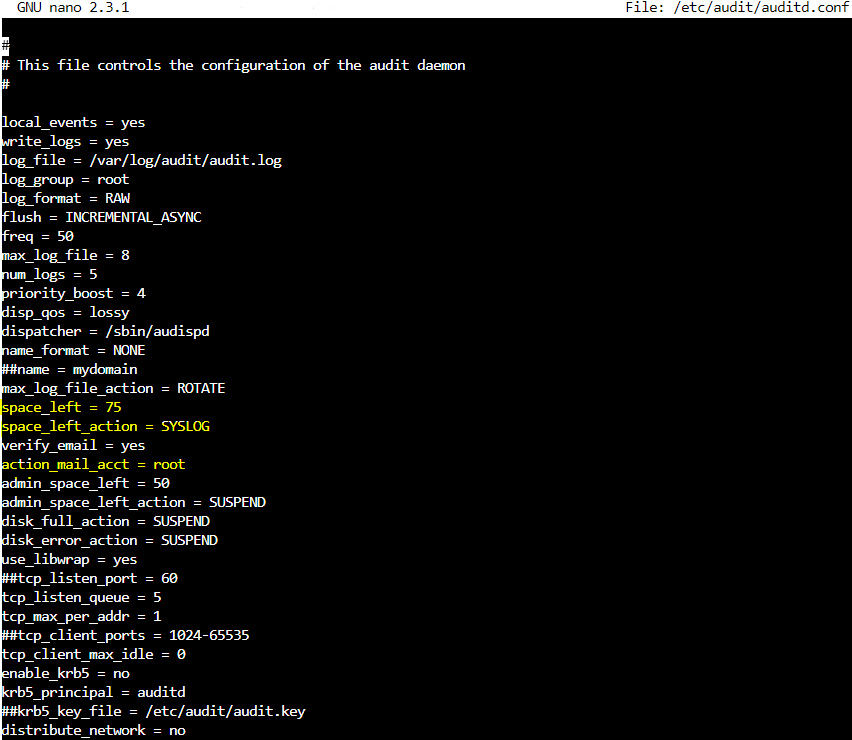
We can see the values that will need to be changed highlighted in yellow.
Please scroll down to the space_left field and change the value from 75 to 100.
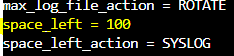
The space_left_action is currently set to SYSLOG. This will need to be changed to email.

Our final value is to set the action_email_acct. It is currently set to root but can be changed to either a group or user account based on our organization’s needs.

The system is now set to send an email alert when only 100MB of disk space remains. Our next step will be to restrict the disk space available for audit logs to 500MB. The two values we will need to change are max_log_file and num_logs.

Our goal is to limit disk space for audit logs to 500. The result of multiplying these two values determines disk space used so we might set them at 50 and 10 (10 * 50 = 500).
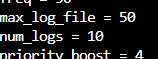
We can use any combination of numbers for the two values that equate to 500 when they are multiplied.
Save your work.
Our final step will be to limit the number of audit buffers our system will use to 5120. This will be done in the audit.rules file.

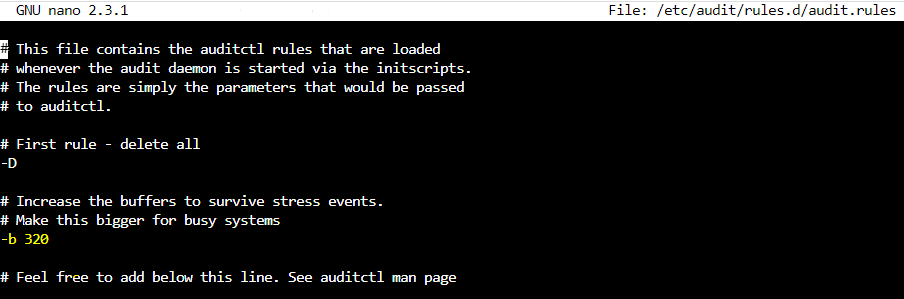
The -b switch is used to limit the audit buffer. It is currently set to -b 320 (this number will be different on your system) and we will change that to 5120.

Save your work.
Our final step in this demonstration will be to restart the auditd service:

This completes our demonstration. We will begin to examine OpenSCAP in our next post.
 Cloud Security Essentials