We introduced the Linux audit system and discussed rules involving file monitoring. In this post we will discuss the system call rules. These are formatted auditctl -a action,filter -S system_call -F arch=b64 field=value -k key_name:
- action and filter: Specifies when something has been logged
- action: Always of Never
- filter: Specifies which kernel rule-matching filter will be applied (task, exit, user, exclude)
- system_call: Specifies system call. This will be listed in /usr/include/asm/unistd_64.h
- -F: specifies the filter to be used
- arch=b64: System architecture
- field: Filter matches based on key values (i.e., group, ID, process ID, etc.)
- group: Filter by Linux group
- user: Filter by user. This can also use ! to negate.
- path: Filter by a single file or directory
- perm: Filter by permissions (r, w, e, a)
- key_name: An optional string used to help admins identify the rule
This example uses auditctl but please remember that rules created with this command will not be persistent.
The way we will build our system call rules is different from how we built the file rules in our previous post. There are some additional options in the command. File rules begin with the -w. System call rules will begin with the -a which will be followed by an action and filter. The action will either be Always or Never. This is used to direct the system to either always log or to never log. The filter is less straightforward. It is dealing with kernel rule matching using keyword matching. Keywords will be task, exit, user, or exclude. Our rule will then define the system call option (system_call) that we are referencing. The rule will then evaluate the defined filters (-F). System calls and filters can both be chained. We just need to make sure to include the -S or -F before each one. Examples of filters are shown in the list above.
Filters can use the ! to negate something. They can also provide another means of file monitoring using path. This appears to be an overlap with the file rules. File rules are only able to match based on permissions. There is no additional filter available and system rules provide this additional granularity.
If we want to log each occurrence of adjtimex or settimeofday system calls are triggered we would use: auditctl -a always,exit -F arch=b64 -S adjtimex -S settimeofday -k time_change

This rule has two system calls that are chained together (-S adjtimex -S settimeofday). It will always log on the exit of these system calls (-a always,exit). Log entries will include the key name time_change. This will make it easier for us to search the logs.
We said that the ! is used for negation. If we want the system to log every time a specific file is written to by every user except bob then we would use: auditctl -a always,exit -F path=/file.txt -F perm=wa -F group=admins -F user!=bob. This rule will log everytime the file /file.txt is written to or has its attributes changed by any user in the admins group except for bob.
The system call rules allow us to monitor files at a granular level by users and groups.

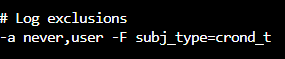
We have been using auditctl to create rules on the fly that are not persistent. This was a good starting point. We are now going to begin learning how to create persistent rules. The format is similar to what we have already discussed but without auditctl. Rules are entered into the /etc/audit/audit.rules file in the exact same format that we have already used.
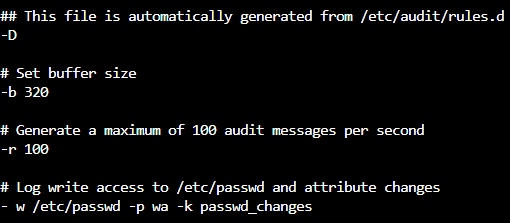
Over time we will tune these rules. For example, a noisy service will fill up our log files and will need to be silenced. This is done by excluding the service in our log.

We are now going to take a look at audit reporting. The aureport tool will query all of the files and then generate a report. This can be used to search by day, month, year, etc.
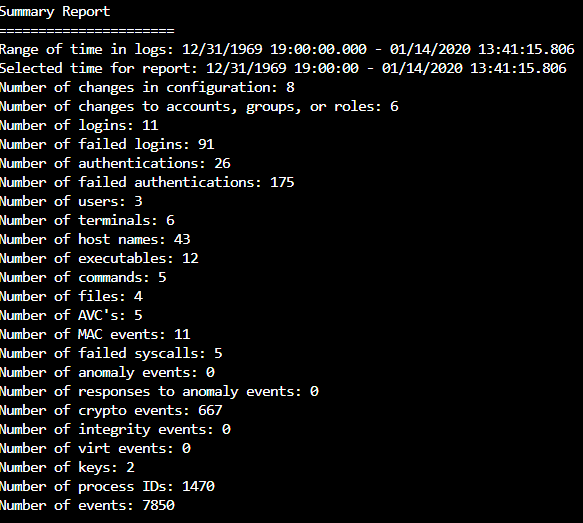
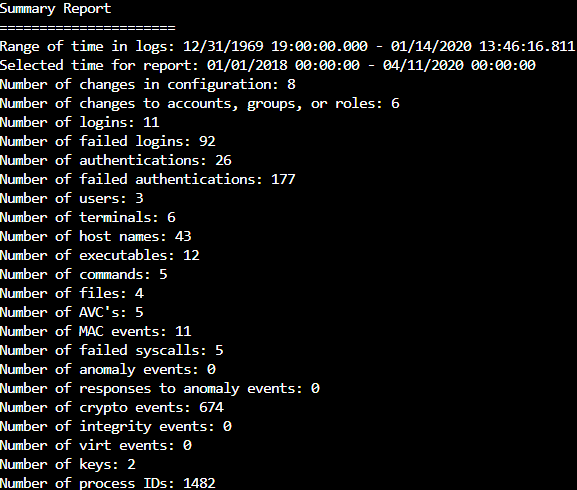
This summary report only shows the number of events because it was run with no filter. Below are examples of reports that can be run:
Generate a summary of events for a date range:

Generate an executed events summary report:

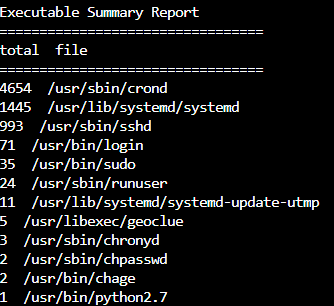
We would remove –summary to generate a report of all executed events on this system (aureport -x).
There are many more options that we can find listed in man aureport.

We will finish today’s post with a discussion of preconfigured rule sets that can be used. The audit service includes a number of these rule sets that can be found in the /usr/share/doc/audit-x.x.x/rules files (x.x.x will be the downloaded version).

When we are dealing with these rule sets they will need to be added into our audit.rules file. This can by done with auditctl but only if we do not want the addition to be persistent:

If we want to add the preconfigured rules into our system so that they will persist we will make a copy and then copy the rules into the audit.rules file:

There are a couple of caveats that we will need to keep in mind when using the preconfigured rule sets. The following is a screenshot from the 30-stig.rules:
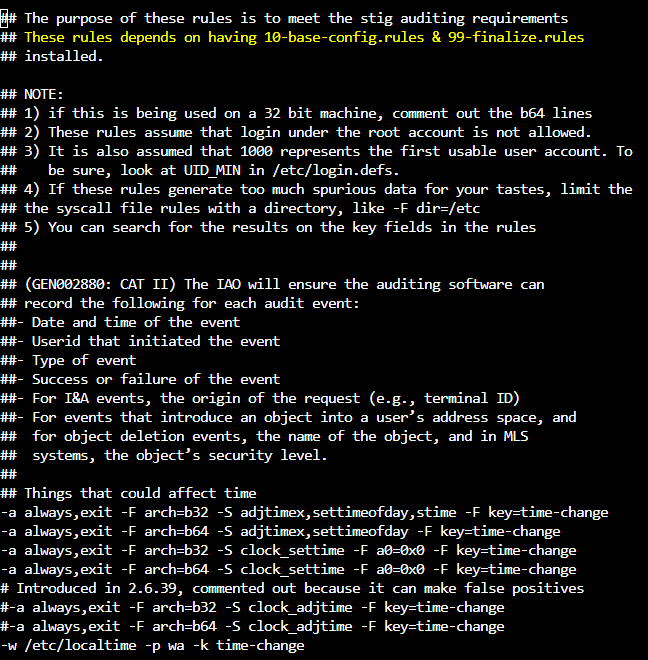
The note at the top tells us that 10-base-config.rules and 99-finalize.rules are required for us to be fully STIG compliant. This means that there will three rule files that must be read in if we are going to use the 30-stig-rules file correctly.
The second thing that we must be aware of is the -D rule. This will delete all previous rules if it is present in a rule file. Rule files are read top down so if we load multiple files we need to make sure there are not multiple -D options present! If there are then a set of rules will be loaded and then deleted when the -D is encountered.
To load the 30-stig-rules with required dependencies:

In this post we have looked at system rules, audit reporting, and preconfigured rule sets. We will continue our discussion in the next post with a demonstration of Red Hat audit setting configuration.
 Cloud Security Essentials