Red Hat auditing is useful for both troubleshooting and security. Security professionals need to know the answers to questions like what has happened on a system, who has done what, what applications have been run, etc. This information is tracked in the Linux audit system.
The Linux audit service will log all of its entries in the audit.log file which is located in the /var/log/audit directory.

The audit.log file has a size restriction that will need to be managed. We will look at in a later post. The file will be closed and a new one created once the maximum file size has been reached. This process is known as log rotation. The old log files will be kept in the /var/log directory.
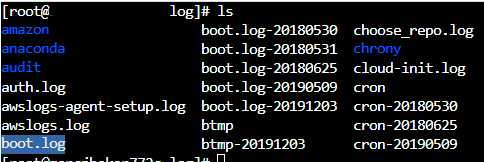
We will look in this directory when we need to look for older events that are not in the audit.log file.
Auditing is required for compliance. We will need to understand how it works on our systems if we are dealing with regulations like HIPAA or PCI.
Audit use cases can include:
- Monitoring system calls
- Monitoring file access
- Monitoring system changes
- Monitoring command execution by users
- Monitoring network access via IP Table rules
We do not want the audit service to log everything that will happen on a system. This could overwhelm our admins and security personnel. It will also take up a lot of space and we will lose information if the data is not being dumped to a syslog server for long-term storage.
The audit system will compare events to rules that we create. The event will be logged if it matches a rule. Rule can be created in several ways:
- auditctl can be used to create rules on the fly. Rules will be immediately enabled but they will not be persistent through a system reboot.
- audit.rules is the file where we will create persistent rules.
We will talk about auditctl in this post because the rule format will be identical to rules we created directly in the audit.rules file.
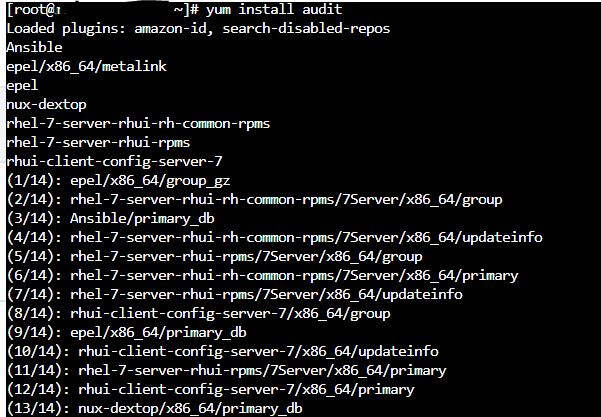
yum install audit is used at a root prompt to install the audit system.
There are several options that are available to be configured when the installation is complete. The config file where these configurations are set is /etc/audit/auditd.conf.
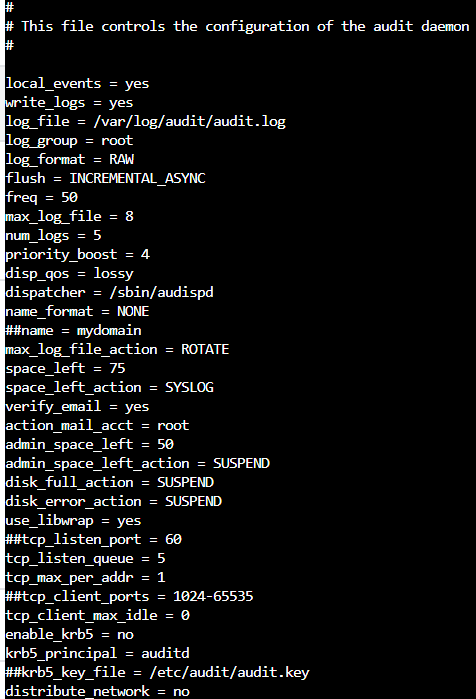
The common options for configuration include:
- log_file: Location for storage of audit log entries (/var/log/audit/audit.log is default).
- max_log_file: Maximum log file size before log rotation will occur in MB.
- numb_logs: Total number of log files to keep.
- max_log_file_action: Directs the system to keep or rotate logs. If this is not set to rotate logs will be kept forever.
- space_left: The disk free space where we will want an action to be triggered when the threshold is reached.
- space_left_action: The action that will be taken when space_left is reached.
- action_mail_acct: The email account to be notified.
Let’s say we want to create a maximum log file size of 100MB utilization of available disk space. We would set the max_log_file to 10 and num_logs to 10, This would provide us with 10MB * 10 which would equal 100MB of disk space. This is how we are able to control the amount of storage space that will be used by the audit service.

auditd is different and does not work consistently with auditctl. When we start or restart the auditd service we will use the older service command (service auditd start).

We will use systemctl enable auditd to enable auditing so that it will be persistent and survive a reboot.

We will use service auditd rotate to force log rotation.


The first rule that we will look at is focused on the file system. There are also system call rules that we will discuss at a later point. This rule will be concerned with files and what happens when certain events happen. The basic format using auditctl (remember that rules created with auditctl are not persistent):
auditctl -w path_to_file -p permissions
- path_to_file: the file or directory that we are auditing
- permission: the permissions that are going to be logged
- r read access
- w write access
- e execute access
- a change to attributes
- key_name: an optional string that is used to help our admins identify logged hits (this can be a simple name)
The key_name is something that we can have inserted into the log entry. This will enable us to more easily be able to search through the log entries.
Let’s say that we want to log access to /etc/passwd and associated attribute changes. We would use auditctl -w /etc/passwd -p wa -k passwd_changes.

This rule is telling the system to audit /etc/password looking for write and attribute changes (-p wa). It will use a key of passwd_changes (-k passwd_changes) to simplify log searching.
In the next post we will cover system call rules and how we can make them persistent.
 Cloud Security Essentials